
.png)


Pawly
End-to-End Application
Solved a common pet care challenge by designing Pawly, an end-to-end mobile app that helps pet owners manage routines with clarity and confidence. The experience introduces structured task tracking, personalized care insights, and a centralized schedule, allowing users to easily stay on top of feeding, medication, and grooming without feeling overwhelmed.
Designer

Role
Designer & Researcher
Timeline
January - March 2026
Core Focus
Branding
Research
UX/UI
Testing
Overview
Pet
Care,
Simplified
In this end-to-end capstone project, I designed Pawly, a mobile app that helps pet owners stay organized and confident in managing their pet’s daily care. I created a centralized experience that combines routine task tracking, a flexible calendar, and personalized care guidance based on a pet’s breed, age, and needs. Key features include recurring task management, “mark as given” confirmations, and a care hub with saveable tips for grooming, feeding, and overall wellness. Through user flows, wireframes, high-fidelity designs, and usability testing, the final solution reduces mental load and helps users stay consistent with their pet care routines.
Discovery
Understanding the Problems
To understand how pet owners manage daily care tasks and keep track of routines, so we can design a solution that provides clear organization, personalized guidance, and reduces the stress of remembering and maintaining consistent pet care.
User Interviews
Interviews Conducted
5
Demographics
3 multi-dog
& 2 shared
household
Method
Moderated
qualitative
interviews
Key Insights from User Research
Shared Tracking
Persistent Reminders
Users managing medication or important tasks expect reminders to continue until the task is confirmed. One-time alerts aren’t enough for high-responsibility care.
"What happens if I don't mark it. I want it to keep reminding me."
Accessible Information
While users appreciated structured care tips, they also expected fast access to urgent information like toxicity or emergency guidance.
"I want to quickly find tips that are specific to my breed of dog."
Competitve Analysis
During user interviews, I identified key challenges in how pet owners manage daily care routines and stay consistent with tasks. I then conducted a competitive analysis of existing pet care apps to understand how they support tracking, reminders, and guidance, and to identify opportunities to create a more intuitive, personalized, and confidence-building experience.
Focus on Tracking
While competitors like DogLog and 11pets provide solid task tracking and logging features, they largely rely on users to decide what care is needed and when. This creates a gap for less experienced or overwhelmed pet owners who need more direction. There is a clear opportunity to introduce proactive, personalized guidance that helps users make informed care decisions rather than just record them.
Experiences Too Complex
Some platforms, like 11pets, offer comprehensive features but feel overwhelming and information-heavy, while others, like DogLog, are simple but lack depth and long-term planning support. This imbalance highlights an opportunity to design a more streamlined experience that maintains clarity while still offering meaningful functionality and value over time.


Affinity Mapping
I created an affinity map to synthesize insights from user interviews and usability testing into key themes around task management, consistency, and caregiver coordination. This helped uncover patterns in how users struggle to stay on top of routines and prioritize pet care tasks, allowing me to focus the problem statement and design features that reduce mental load and support more consistent, confident care.

Definition
Problem Statements
Household Coordination & Recurring Care
In multi-caregiver households where pet care responsibilities are shared among spouses and children, dog owners often rely on routine, memory, and verbal communication to manage recurring tasks such as monthly medications and vet visits. This lack of centralized visibility leads to confusion, missed or duplicated treatments, and increased mental load on one primary caregiver. As a result, pets are at risk of inconsistent care, and there is an opportunity for a product to improve user trust, engagement, and long-term retention by addressing this coordination gap.
Breed-Specific Care Clarity
Dog owners seeking breed-specific care guidance frequently turn to online searches and social platforms, where information is often generalized, conflicting, or difficult to verify. This creates uncertainty and reduces confidence in managing their dog’s long-term health needs. Without access to trusted, relevant guidance tailored to their pet, users experience frustration and diminished reliance on any single platform, limiting sustained engagement and loyalty to a pet care product.
Personas
Based on user research, I developed two personas representing different pet care needs: a busy household coordinator managing multiple responsibilities and a new pet owner seeking guidance and reassurance.
.png)
Sarah
The Household
Coordinator
Age:
38
Gender:
Female
Occupation:
Marketing
Manager
Bio:
Sarah works full-time and manages most household logistics. Her kids help with feeding and walking, and her husband helps occasionally, but she is the default decision-maker for vet visits and medications.
Needs & Goals
-
Peace of mind
-
Protecting her pets’ health
-
Efficiency in a busy household
-
Visibility across caregivers
-
Ensure dogs never miss medications or vet visits
-
Share responsibility without constant reminders
-
Keep all records in one place
-
Reduce mental load
“I don’t mind managing it, I just don’t want to manage it alone.”
Pain Points
-
“I thought you gave it” confusion
-
Monthly heartworm doses get forgotten
-
Vet reminders buried in emails
-
Multiple dogs = separate schedules
-
Feels responsible if something is missed
.png)
Jason
The New Pet Parent
Age:
32
Gender:
Male
Occupation:
Remote
Software
Engineer
Bio:
Jason and his spouse recently adopted their first dog. They want to “do everything right.” He spends time Googling breed-specific care tips and watching YouTube videos.
Needs & Goals
-
Being a responsible pet owner
-
Avoiding costly vet emergencies
-
Learning proactively
-
Confidence in decision-making
-
Understand breed-specific needs
-
Prevent common health issues
-
Create good routines early
-
Feel confident as a new dog owner
-
Share responsibility with spouse
"I just want to know I am doing this right."
Pain Points
-
Information overload online
-
Conflicting advice
-
Unsure about grooming frequency
-
Doesn’t know what’s “normal” behavior
-
Hard to know what applies specifically to his breed
User Needs & Wants
Clear Task Visibility & Tracking
Users need an easy way to see what tasks need to be done and what has already been completed.
Consistent & Reliable Reminders
Users want reminders they can trust, especially for critical tasks like medication and feeding.
Personalized Care Guidance
Users need support in knowing what care their pet actually requires.
Simple Coordination Across Caregivers
Users want an easy way to share responsibilities with family members or other caregivers.
Ideation
User Flows
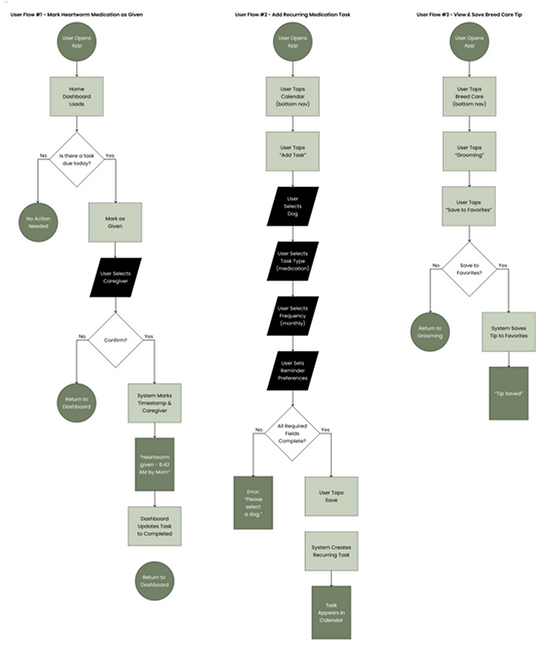
User flows were developed to map key interactions within the Pawly app, focusing on task tracking, routine management, and caregiver coordination. The flows include marking medication as given, adding a recurring task, and viewing and saving breed care tips, highlighting key touchpoints, task confirmations, and decision points to create a more consistent, intuitive, and confidence-building care experience.
.png)
.png)
Low-Fidelity Wireframes
To explore initial design concepts for Pawly, I created low-fidelity wireframes to visualize key features like task tracking, recurring task creation, and the breed care hub. This approach allowed me to quickly map out core interactions, navigation patterns, and content structure across the app. Working at a low-fidelity level made it easy to iterate, test layout ideas, and identify opportunities to improve clarity, organization, and overall usability before moving into high-fidelity design.


Branding
I developed the full branding and design system for Pawly to create a cohesive and approachable pet care experience. A key focus was establishing a clear visual identity that balances functionality with a warm, supportive tone to build trust with users. I defined the app’s color palette, typography, and component system, while refining spacing, hierarchy, and layout patterns to ensure clarity and ease of use. By creating consistent and scalable design foundations, the experience supports intuitive navigation and reinforces confidence as users manage their pet’s daily care.
Style Tile

UI Kit
Since Pawly was designed from the ground up, I created a comprehensive UI kit and component library to support a consistent and scalable experience. This included key components such as task cards, buttons, form elements, navigation patterns, and confirmation states, all designed to align with the app’s overall visual system. Building these reusable components ensured consistency, enabled efficient iteration, and supported seamless expansion as new features and flows were developed.
.png)
High-Fidelity Screens
Once the design direction was finalized, I moved into high-fidelity screens to bring Pawly to life across key user flows. I applied the design system and component library I created, ensuring consistency across experiences like marking medication as given, adding recurring tasks, and exploring breed care tips. This step allowed me to refine visual hierarchy, interaction details, and content clarity, resulting in an experience that feels intuitive, organized, and confidence-building for users managing their pet’s care.


.png)
.png)
Key Features
Shared Task Dashboard
A centralized view of all pet care tasks across daily, weekly, and monthly timelines. Helps caregivers quickly see what needs to be done and stay aligned.
Task Completion Logging
Lets users mark tasks as complete with a timestamp and assigned caregiver. Reduces confusion and ensures tasks aren’t missed or duplicated.
Breed Care Hub
Offers personalized care tips based on a dog’s breed, including grooming, feeding, and exercise. Helps users feel more confident in their care decisions.
Testing
Usability Testing
I conducted five moderated usability tests using an interactive Figma prototype, with each session lasting approximately 30 minutes. Participants were able to successfully complete key tasks, including marking medication as given, adding a recurring task, and finding and saving care tips, indicating that the overall experience was intuitive and easy to navigate. Feedback was largely positive, with users responding well to the clear task-based interactions and navigation, while a few opportunities for refinement were identified to further improve content clarity and scannability.
What Worked
100% Completion
All participants were able to successfully complete the core tasks without assistance. This indicates that the flows were clear, intuitive, and aligned with user expectations.
Intuitive Navigation
Users were able to move between the Home Dashboard, Calendar, and Breed Care Hub with ease. The navigation structure supported quick understanding and efficient task completion.
Clear Task Interactions
Features like “Mark as Given” were immediately understood and used without hesitation. Strong affordances and clear CTAs made key actions feel simple and reliable.
Improve Tip Scannability
Users paused when browsing grooming tips, indicating difficulty scanning content quickly.
Enhance Content Clarity
While users completed tasks successfully, minor moments of hesitation suggested opportunities to improve clarity.
Opportunity for Improvement
Priority Revisions
Based on usability testing feedback, I identified priority revisions to improve the breed care experience, with a primary focus on tip scannability. While users were able to find and save tips, many paused to scan content, indicating a need for more efficient navigation. To address this, I introduced filter tags to help users quickly refine and sort tips by category, along with improvements to visual hierarchy and content structure. These updates enhance clarity, reduce cognitive load, and allow users to find relevant care information faster and with greater confidence.
.png)


